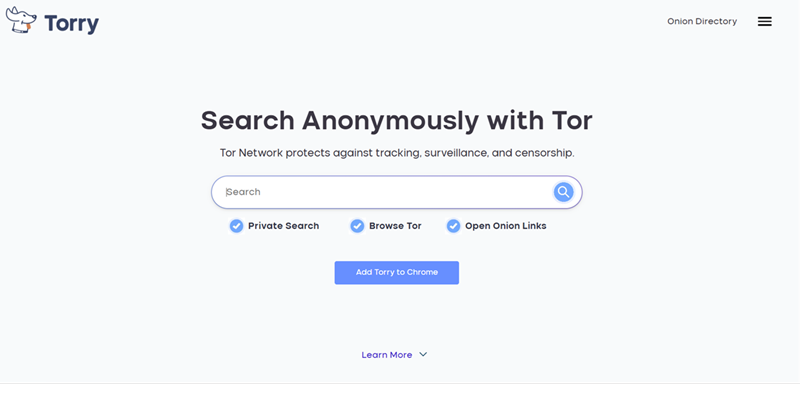
Most people who want to explore the dark web immediately think: “I have to download the Tor Browser.” But what if you could search and visit .onion sites straight from Chrome, Firefox, or even your phone — without installing anything extra?
That’s exactly what Torry.io promises. It combines a Tor proxy service with its own search engine, letting you access the dark web conveniently from the clearnet.
What Is Torry.io and How Does It Work?
Torry.io routes your requests through the Tor network in the background. You type a search or paste an .onion link, and results appear in a simple, modern interface. It also offers a Chrome extension and Android app, making dark web access feel almost like normal browsing.
Torry.io main products
Torry.io is all about keeping your online activities private with its suite of tools, including Torry Search, Torry AI, and a handy Chrome Extension.
Core Offerings:
- Torry Search: This is an encrypted search engine that sends your requests through the Tor network, letting you access and explore .onion websites directly, no need for a separate Tor browser.
- Torry AI:A private AI platform that channels your prompts and requests to cutting-edge AI models via the Tor network, perfect for anonymous text chats, roleplay, and even image generation.
- Torry Chrome Extension:This browser extension makes it easy for you to tap into privacy-focused features right within Google Chrome.
- Onion Directory:A well-organized directory that lists various .onion services and dark web search engines, helping you navigate and understand the network safely.
How Torry Browser Protects Your Privacy
The Torry Browser is engineered to safeguard your privacy while navigating the dark web, utilizing the robust Tor network infrastructure. Here’s how it ensures your anonymity:
- Onion Routing: Data is encrypted and routed through multiple relays, obscuring your online trail.
- Anonymous IP Address: Your IP address is concealed, replaced by that of an exit node, making tracking nearly impossible.
- No Tracking Cookies: The browser blocks tracking cookies by default, preventing the build-up of your browsing profile.
- HTTPS Everywhere: Enforces secure connections, encrypting data between your device and visited sites.
- Isolated Browsing Sessions: Each tab operates independently, ensuring no cross-site data leakage.
- JavaScript Control: Disables JavaScript by default to minimize tracking risks, with optional per-site enabling.
- Regular Updates: Frequent updates patch vulnerabilities and enhance privacy features.
- Community-Driven Development: Benefits from global contributions, quickly addressing potential privacy issues.
- User-Friendly Interface: The Torry Browser is designed with a simple and intuitive interface, making it accessible to users of all technical skill levels.
- Dark Web Access: The browser provides seamless access to .onion sites, which are only accessible through the Tor network.
- Customizable Security Settings: Users can adjust the security settings to balance between privacy and functionality.
- Built-In Tor Circuit Display: The browser shows the current Tor circuit, including the entry, middle, and exit nodes.
The Torry Browser empowers users to browse the dark web securely, protecting against surveillance and data tracking, making it an essential tool for maintaining online anonymity. For maximum discovery, torch browser is perfect alternative for dark web browing
Torry.io vs Ahmia vs Torch vs Haystak – 2026 Comparison
| Search Engine | Access Method | Index Size | Safety / Privacy | Ease of Use | Best For |
|---|---|---|---|---|---|
| Torry.io | Clearnet + extension (no Tor Browser needed) | Medium | Medium (proxy-based) | Excellent – beginner friendly | Quick access, mobile users |
| Ahmia | Tor Browser or clearnet mirror | Medium (curated) | High (filters harmful content) | Good | Safe research & beginners |
| Torch | Tor Browser only | Very Large | Low (uncensored) | Basic but fast | Maximum discovery |
| Haystak | Tor Browser only | Large | Medium | Good with advanced options | Deep research |
Beginner's Guide to Anonymous Browsing with Torry Browser
Online privacy has become a growing concern as websites, advertisers, and third parties collect data about users' browsing habits. Anonymous browsing helps reduce online tracking and gives users greater control over their personal information while exploring the internet.
Torry Browser is a privacy-focused browser designed to enhance anonymous browsing and improve online security. It helps users minimize digital tracking and browse with greater confidence, making it suitable for anyone who values internet privacy.
Many people connect anonymous browsing with the dark web, but privacy technology has many legitimate uses. The dark web consists of websites that use special onion addresses instead of traditional domains and are designed to provide additional privacy for both visitors and publishers. Journalists, researchers, developers, and privacy advocates often use these networks to communicate and access information securely.
Using Torry Browser responsibly means combining it with good cybersecurity practices. Always keep your browser updated, use strong and unique passwords, enable multi-factor authentication, and avoid downloading files or visiting websites you do not trust. Anonymous browsing improves privacy, but it should be part of a broader approach to online security.
Whether you're protecting your identity on public Wi-Fi, researching sensitive topics, or simply reducing online tracking, Torry Browser provides a practical solution for privacy-conscious users. By understanding how anonymous browsing and privacy technologies work, you can make informed decisions and enjoy a safer, more secure internet experience while exploring both the traditional web and privacy-focused networks.
Pros & Cons of Torry.io Browser
Pros of Torry.io Browser
- Enhanced Privacy: Designed to reduce online tracking and improve user privacy.
- Anonymous Browsing: Helps users browse with greater anonymity than conventional browsers.
- Access to Onion Services: Supports browsing privacy-focused websites that use onion addresses.
- Open Web Compatibility: Can be used for both regular websites and privacy-focused networks (if supported).
- Privacy-Focused Design: Emphasizes user confidentiality over behavioral tracking.
- Reduced Third-Party Tracking: May limit cookies, trackers, and fingerprinting techniques.
- Cross-Platform Availability: Convenient if available on multiple operating systems.
- Easy to Use: Offers a familiar browsing experience for users new to privacy tools.
Pros of Torry.io Browser
- Slower Browsing Speeds: Privacy-enhancing technologies can introduce additional latency.
- Website Compatibility: Some websites may not function correctly with strict privacy protections enabled.
- Learning Curve: Users unfamiliar with anonymous browsing may need time to understand privacy settings.
- Limited Extensions: Certain browser add-ons may be unavailable or discouraged for privacy reasons.
- Streaming Restrictions: Some streaming or banking services may require additional verification or work differently with privacy-focused browsers.
- No Complete Anonymity: No browser can guarantee total anonymity; user behavior and device security still matter.
- Requires Regular Updates: Keeping the browser current is essential for security and performance.
Who Should Use Torry.io Browser?
Torry.io Browser may be a good fit for:
- Privacy-conscious internet users
- Journalists and researchers
- Security professionals
- Remote workers using public Wi-Fi
- Users who want to reduce online tracking
- Anyone interested in learning about privacy-enhancing browsing technologies
Is Torry.io Safe to Use in 2026?
Torry.io is reasonably safe for casual browsing, but because it acts as a proxy, your traffic passes through their servers first. For better protection, always pair it with a strong VPN. Torlinks has put together a list of dark web markets, vendors and directories for anonymous browsing
VPN + Torry.io vs Other Setups – 2026 Comparison
| Combination | Privacy | Convenience | Speed | Ease for Beginners | Recommended When... |
|---|---|---|---|---|---|
| VPN + Torry.io | High | ★★★★★ | Fast | Very Easy | You want simple .onion access with decent protection |
| Torry.io Only | Medium | ★★★★★ | Very Fast | Extremely Easy | You prioritize speed and simplicity over maximum privacy |
| VPN + Tor Browser | Excellent | ★★★☆☆ | Medium | Moderate | You need strong anonymity (journalists, activists) |
| Tor Browser Only | Very High | ★★☆☆☆ | Slow | Medium | You accept slower speeds for maximum security |
To explore our in-depth reviews of privacy-focused browsers and search tools, take a closer look at DuckDuckGo and the Excavator Tor browser.
Pro tip: For maximum anonymity, use the official Tor Browser. Torry.io shines when you want speed and simplicity. Check our 2026 best VPNs for dark web safety.
Final Verdict
In 2026, Torry.io is one of the most user-friendly ways to dip into the dark web without hassle. It won’t replace the official Tor Browser for high-privacy needs, but it’s excellent for quick searches and casual exploration.
Best strategy: Use Torry.io for convenience and Ahmia/Torch when you need deeper or safer results.
FAQ: Torry.io & Dark Web Search Engines in 2026
1. Does Torry.io replace the Tor Browser?
No — it makes access easier but trades a bit of privacy for convenience.
3. Is torry browser safe?
Torry is generally safe for private searching, but it does not provide the same level of security as the official Tor Browser.
2. Is Torry.io better than Ahmia or Torch?
It depends on your goal. Torry wins on ease of use; Ahmia on safety; Torch on size of index.
3. Can I use Torry.io on mobile?
Yes, their Android app works well for browsing onion sites on the go.
Disclaimer
This article is for educational and cybersecurity awareness purposes only. Always practice good OPSEC. Never use these tools for illegal activity.